Graph-Native
Multi-Agent AI
A self-hosted agent runtime where memory is a knowledge graph, a coordinator routes each message to a planner, builder, researcher, or DevOps agent, and skills and MCP servers plug in at runtime. Written in Jac, the AI-native language built on Jaseci.
1st place out of 200+ teams
Graphclaw won JacHacks 2026, the hackathon for building on Jac and Jaseci. The idea was a different memory architecture for OpenClaw-style agents: instead of flat files, the assistant's identity, skills, MCP servers, and conversations live in one knowledge graph, and Jac walkers route work across specialist agents that all read from it.
Everything you need for AI agents
Agents that share one graph memory, reachable from the chat apps you already use, with skills and MCP servers that plug in at runtime.
Graph Memory
Facts live as typed nodes with confidence scores that decay over time. The Dream walker tombstones stale nodes, re-validates fading ones, and keeps topic tags fresh.
Multi-Agent Team
A Coordinator routes each message to a Planner, Builder, Researcher, or DevOps agent, each with its own tools. All of them read the same memory graph.
Runtime Skills
Native skills (skill.json + skill.py) and OpenClaw-style SKILL.md workflows. Ask for a missing capability and it offers a ClawHub skill or installs one from a GitHub URL once you approve; no restart.
MCP Servers
Every MCP server in your config exposes its tools, resources, and prompts to the agents. Playwright and Base44 MCP servers can be registered on demand.
5 Channels
Telegram, Discord, Slack, Email (IMAP/SMTP), and WhatsApp (via a bridge), plus a local CLI. One message bus routes everything.
Multi-Provider
LiteLLM under the hood: OpenRouter by default, plus Anthropic, OpenAI, DeepSeek, Groq, and local Ollama models.
How a message flows
Every channel feeds one message bus. Each message becomes a session turn in graph memory, gets routed to a specialist agent, and the reply is written back to the graph before it goes out.
start_session() and append_turn() record who said what, on which channel.
The highest-confidence live memories, up to 3,000 characters, are prepended to the prompt.
Pairing commands, skill-install approvals, and rename or persona updates are handled before any agent runs.
CoordinatorAgent walker classifies intent with by llm() and falls back to a general agent below 0.6 confidence.Anything that matches no specialist goes to a general agent with web search, the skill runtime, and every configured MCP server.
After each reply the session's turns become memory nodes with confidence, topic tags, and a source session.
Consolidates leftover sessions, tombstones memories whose confidence has decayed to zero, re-validates fading ones, tags untagged ones, and links related memories.
Memory is a graph, not a file
The assistant starts with a seeded root graph for its identity, skills, and MCP servers, then grows it with every conversation. It is stored as JSON in your workspace, so you can read it and back it up.
assistant_root  (Graphclaw root node)
├─ has_name ───────────▶ Name
├─ has_identity ───────▶ Identity
├─ has_soul ───────────▶ Soul
├─ speaks_with_cadence ▶ Conversation cadence
├─ runs_dream_cycle ───▶ Dream cadence (2h)
├─ has_skills ─────────▶ Skills root
│   └─ has_skill_group ▶ inherent, clawhub,
│                        workspace, shared
│       └─ has_skill ──▶ base44, loveable
└─ has_mcp ────────────▶ MCP root
    └─ has_mcp_group ──▶ servers, tools,
                         resources, prompts

per conversation:
session ▶ turns ▶ memories ─related_to─▶ memories
Confidence decay
Each memory has a confidence and a decay rate (0.01 per day by default; the seeded identity nodes don't decay). User turns start at 0.7 and assistant turns at 0.6.
Recall
Before each reply, the highest-confidence live memories (up to 3,000 characters) are added to the prompt. Recall walkers also search by text and type (User, Feedback, Project, Reference) and rank by confidence.
Dream walker
Every 2 hours: tombstones memories at zero confidence, re-validates the ones between 0.2 and 0.6, tags untagged memories with topics, and adds related_to edges.
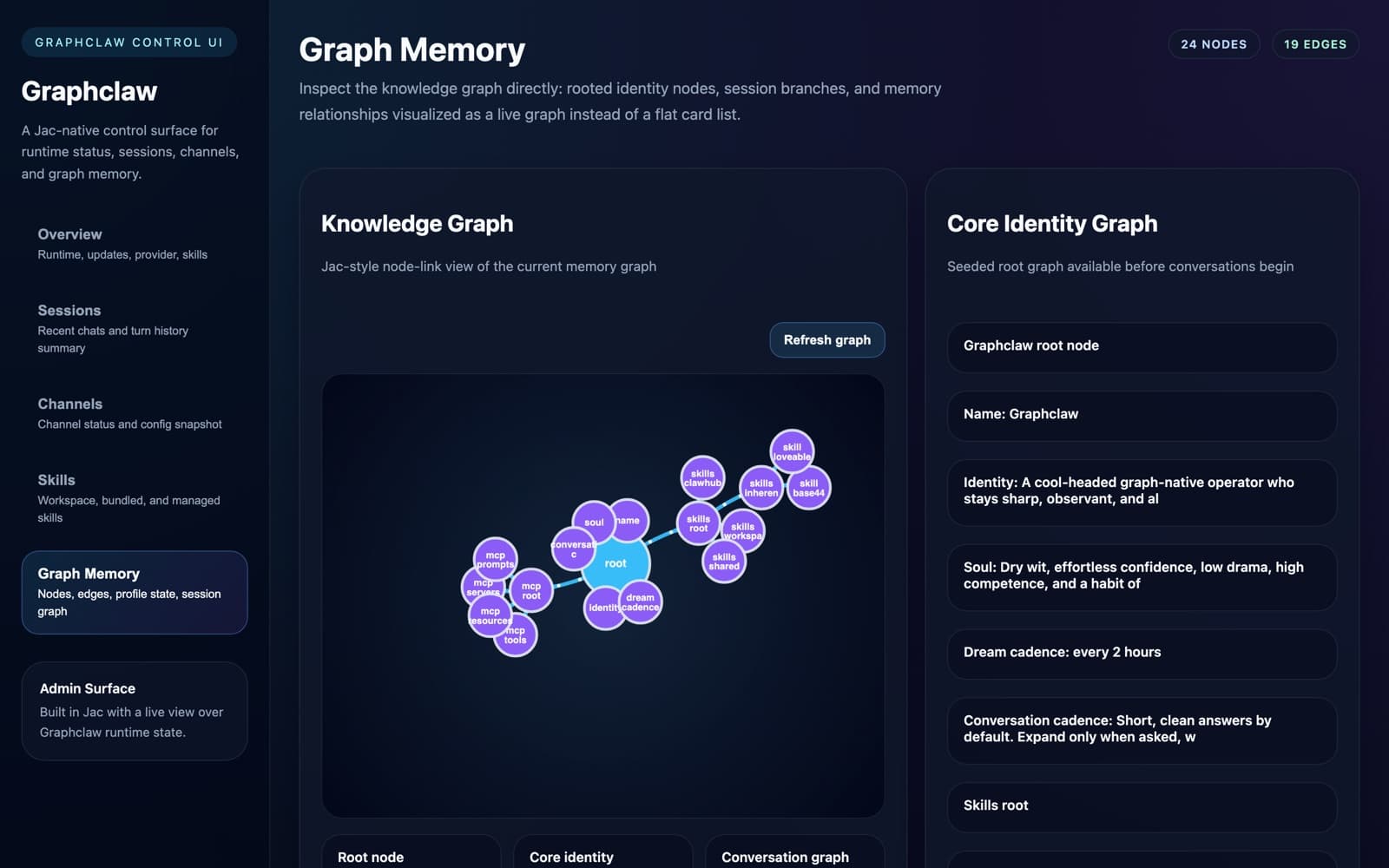
127.0.0.1:18789.Extensible Skill System
Two skill types that extend your agents at runtime. A new skill loads on the next session, with no restart.
Native Skills
Fast, typed Python modules with a JSON manifest.
ClawHub Skills
Community skills from the ClawHub registry, installed after you approve.
One Bus, 5 Channels
Connect your agents to any platform. One message bus routes everything.
Why Graphclaw?
Inspired by nanobot and OpenClaw. It keeps the claw-style agent and skill feel, and re-centers the runtime on a persistent knowledge graph.
| nanobot | OpenClaw | Graphclaw | |
|---|---|---|---|
| Implementation | Python, lightweight assistant | TypeScript, web-first agent runtime | Jac + Python, graph-native runtime |
| Memory | Flat markdown / file memory | Files, skills, runtime state | Workspace-backed knowledge graph |
| Agents | Single assistant | Agent runtime | Coordinator + 4 specialist agents |
| Skills | Limited next to claw ecosystems | Strong SKILL.md ecosystem | Native skills + SKILL.md + ClawHub |
| MCP | Not the focus | Major part of its direction | Configured servers exposed to all agents |
| Operator UI | Usually minimal | Important product surface | Jac-native dashboard with a live graph view |
Self-host Graphclaw
There is no public demo on purpose. Graphclaw runs on your machine, with your model key. These steps were tested on a clean install against the current code.
The Builder and DevOps agents have a shell tool that runs commands on the host without a sandbox, and single-user mode has auth turned off. Anyone who can message your bot can ask it to run commands, so keep Telegram and Discord on pairing or an allowlist (the default), and don't expose the dashboard or jac start server to the internet.
- 1
Check the prerequisites
- Python 3.12 or 3.13. 3.14 is not supported by jaclang yet. If neither is found, the installer tries Homebrew on macOS or the deadsnakes PPA on Debian/Ubuntu.
- Git.
- A model key: OpenRouter (recommended, one key for Claude and others), Anthropic, or OpenAI. Ollama works with no key.
- The dashboard is a Jac client app; jac-client downloads its own Bun binary the first time, so Node is not required.
- 2
Run the installer
curl -fsSL https://raw.githubusercontent.com/zero-abd/graphclaw/main/install.sh | bashIt clones the source to
~/.graphclaw/source, creates a virtualenv at~/.graphclaw/venv, and installsjaclangplusgraphclaw[channels]. - 3
Answer the three setup prompts
- Deployment mode: 1 Single-user (personal agent, no auth) or 2 Multi-user (JWT auth). Pick 1.
- LLM provider: 1 OpenRouter, 2 Anthropic, 3 OpenAI, 4 Ollama, 5 Skip. Paste your key when asked. The default model is
openrouter/anthropic/claude-sonnet-4-6. - First chat interface: 1 Telegram, 2 Discord, 3 Slack, 4 Skip. Each option prints a walkthrough for creating the bot token. Skip is fine: you can chat in the terminal.
It writes
~/.graphclaw/config.json,~/.graphclaw/.env, a launcher at~/.graphclaw/run.sh, and agraphclawalias in your~/.zshrcor~/.bashrc. - 4
Start it
source ~/.zshrc      # or ~/.bashrc, once
graphclaw
You should see:
[graphclaw] starting -- workspace: ~/.graphclaw/workspace
[graphclaw] dashboard: http://127.0.0.1:18789/
[graphclaw] no channels enabled -- running in CLI mode
[graphclaw] ready
Type your message (Ctrl+C to exit):
>
The dashboard opens at
http://127.0.0.1:18789/(its API is on port 18790). To run without it, set"dashboard": { "enabled": false }in the config or exportGRAPHCLAW_DASHBOARD_DISABLE=1. - 5
Add more channels
Edit
~/.graphclaw/config.jsonand restartgraphclaw. Only the channels with"enabled": truestart. Email uses IMAP and SMTP over SSL and polls unread mail; WhatsApp talks to a bridge that servesGET /messagesandPOST /send.{ "channels": { "telegram": { "enabled": true, "bot_token": "123456:ABC..." }, "discord": { "enabled": true, "bot_token": "..." }, "slack": { "enabled": true, "bot_token": "xoxb-...", "app_token": "xapp-..." }, "email": { "enabled": true, "imap_host": "imap.example.com", "smtp_host": "smtp.example.com", "username": "bot@example.com", "password": "app-password", "poll_interval": 30 }, "whatsapp": { "enabled": true, "bridge_url": "http://localhost:3001", "api_token": "" } } } - 6
Approve who can talk to it
Telegram and Discord default to pairing for unknown DMs and an allowlist for groups. When a new user messages the bot, it replies with a pairing code. Approve it at the
>prompt in your terminal:> pairing list telegram > pairing approve telegram <code> - 7
Connect MCP servers (optional)
Every configured server's tools, resources, and prompts are exposed to the agents. Add them under
mcpServers:{ "mcpServers": { "filesystem": { "enabled": true, "command": "npx", "args": ["-y", "@modelcontextprotocol/server-filesystem", "/path/to/root"] } } } - 8
Keep it up to date
graphclaw status     # current vs. latest commit
graphclaw update
graphclaw rollback